
See YOCO
at Work in the Real World
From course development and corporate training to product demos and multilingual content, YOCO helps organizations create professional presentations and turn them into polished, narrated videos. Where customer materials are confidential, we use anonymized scenarios and official demos to show the real-world value.
AI Presentation Generator
Create editable, animated PPTX files from a topic and source materials
Presentation-to-Video
Keep narration, voice, and subtitles synchronized with slides and animations
AI Avatar Narration
Use ready-made or custom avatars for courses and knowledge videos
Real-World Use Cases
See how teams use YOCO to produce content for practical business and education needs.
Business Reviews and Project Reports
Turn a topic, brief, or existing materials into a clearly structured presentation with a consistent visual style.
- Choose a business template
- Upload reference materials
- Set length and key priorities
- Edit each slide and export to PPTX
Classroom Teaching and Course Development
Create teaching slides from a topic and source materials, then turn new or existing decks into narrated videos.
- Choose subject-specific prompts
- Generate editable animated slides
- Create course scripts automatically
- Add synchronized AI avatar narration
Employee Onboarding and Skills Training
Transform policies, processes, and product materials into consistent training decks and reusable videos.
- Build training outlines quickly
- Standardize presentation and video styles
- Sync scripts with animation steps
- Reuse content after updates
Policy Communication and Public Services
Turn policy documents and operational materials into focused presentations and easy-to-share narrated videos.
- Organize content from source files
- Highlight key points slide by slide
- Generate voiceovers and subtitles together
- Publish for online briefings and training
Proposals and Product Introductions
Build proposal decks from customer needs, product information, and project context, then share them as on-demand videos.
- Structure the proposal
- Match it with a business template
- Add screen recordings and media
- Generate an AI avatar video
Multilingual Learning and Knowledge Sharing
Create voiceover and subtitle versions in multiple languages from one presentation for global training and distribution.
- Choose multilingual voices
- Display bilingual subtitles
- Switch between AI avatars
- Manage every version consistently
AI Presentation Demos
Choose a template, add prompts and source materials, then review every slide before generating your presentation.
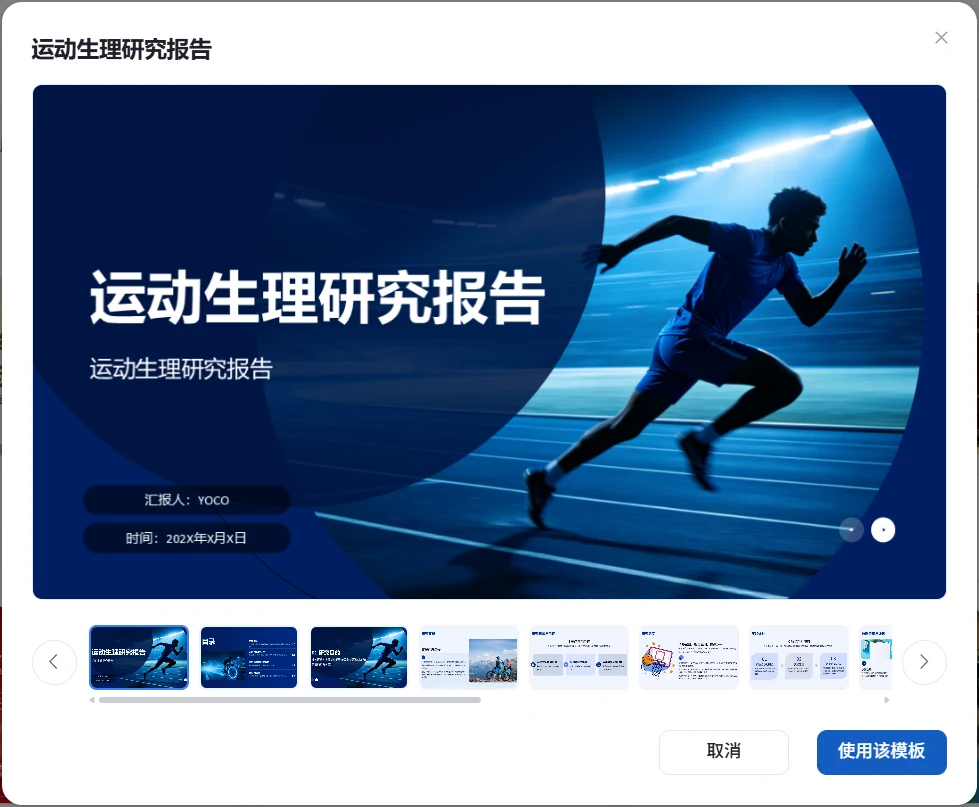
Choose a Template to Get Started
Preview templates for business, education, public-sector, and other scenarios before choosing your cover and slide style.
View Documentation →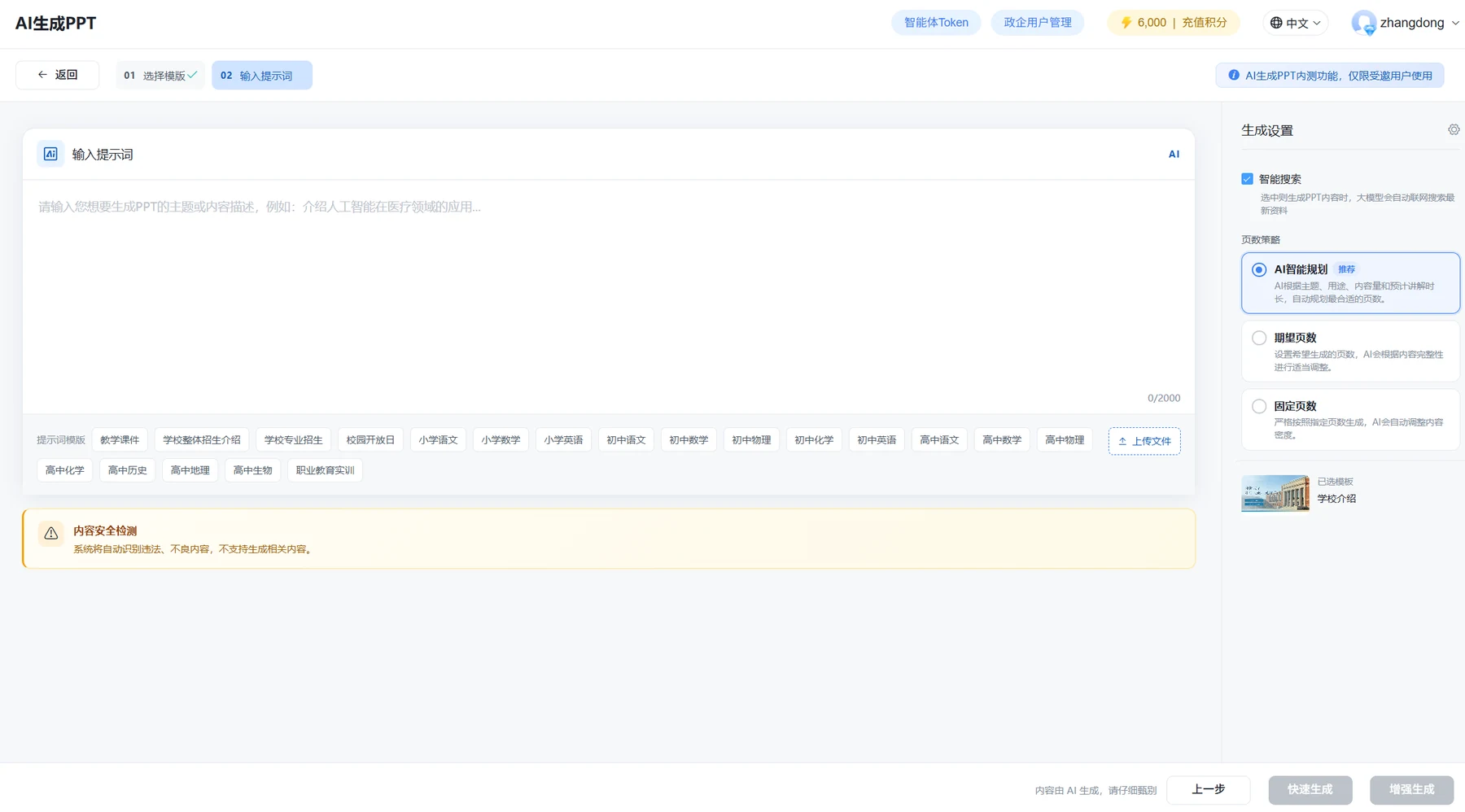
Set Your Prompt, Sources, and Slide Count
Describe what you need, choose a prompt template, upload source files, and set the desired number of slides.
View Documentation →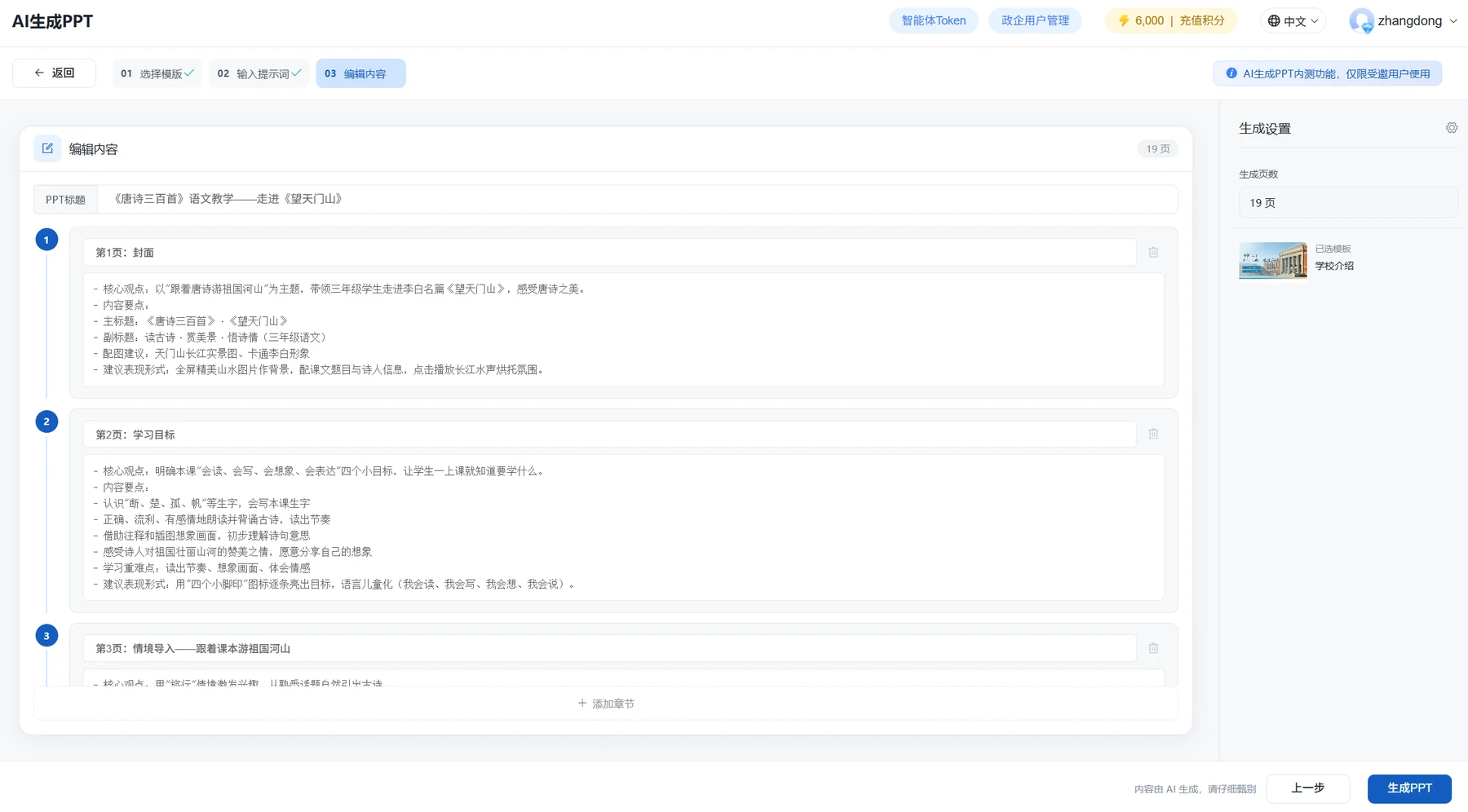
Review Every Slide Before Generation
Confirm the title, sections, and slide-by-slide content before generating a downloadable PPTX file.
View Documentation →Narrated Video Feature Demos
Watch animation synchronization, dynamic annotations, bilingual content, and accurate technical narration in action.
Animation Synchronization
YOCO detects every presentation animation trigger and aligns the script with each step, so visuals appear exactly when they are discussed.
Embedded Audio and Video
Preserve embedded audio and video from presentations and control when each asset plays.
Dynamic Annotations
Add underlines, circles, arrows, and highlights that animate naturally, just like live presenter annotations.
Bilingual Content
Create multilingual voiceovers, bilingual subtitles, and custom subtitle styles for international learning and global distribution.
Technical Content Narration
Improve narration of mathematical formulas, chemical notation, numbers, letters, and specialist terminology.
3D Model Presentations
Display, rotate, zoom, and interact with .glb models for medical, engineering, and product presentations.
Customer Success Stories
These examples highlight real uses of presentation-to-video and AI avatars. Customer identities and proprietary materials have been anonymized where required.
Leading Research University: Bilingual Course Development
The university uses YOCO to turn specialist course presentations into AI avatar videos with bilingual subtitles. Accurate narration of terminology, formulas, and charts supports international teaching and gives overseas learners easier access to course content.
National Vocational Education Resource Center: Video Production at Scale
The organization imports presentation-based lessons in batches and generates AI avatar videos with consistent intros, outros, and subtitle styles. YOCO preserves presentation animation logic, enabling the team to build a large video library on a short timeline.
Major Energy Group: Standardized Safety Training
The group converts presentations on safety policies, operating procedures, and equipment management into standardized video courses. A consistent AI instructor and template system make updates faster while keeping training aligned across regions.
IT Training Provider: Scalable Technical Course Production
The provider creates operating system, software development, and certification training for enterprise customers. YOCO turns technical presentations into narrated videos and makes revisions as simple as uploading an updated deck, reducing recording costs and release time.
Healthcare Vocational College: Microlearning and Teaching Videos
Faculty use YOCO to produce short nursing and pharmacy lessons with AI avatar narration, animated annotations, and highlighted key points. Teachers can create engaging, clinically relevant content without complex video-editing tools.
Start with a Topic or Presentation
Generate a presentation from a topic, or upload an existing PPT to create scripts, voiceovers, subtitles, and AI avatar videos.